Are you looking for a reliable solution to automate the testing of your Power BI reports and dashboards? Look no further! Introducing BI Validator, the ultimate no-code Testing Tool designed specifically for Power BI (PBI) Reports.
Better Decisions: Reliable reports lead to better decisions, impacting your organization’s bottom line.
Higher Adoption: Boost trustworthiness and encourage better adoption rates with testing automation.
Cost Reduction: Minimize human intervention, saving both time and money while delivering quality results.
Key Features of BI Validator:
Automate Testing of Power BI Upgrades & Migrations: Easily perform regression testing and compare reports across different environments during migrations.
No-code Test Automation for Power BI: Integration with Microsoft Power BI eliminates the need for custom programming.
Functional Testing of New Power BI Deployments: Identify differences between visual data and SQL output to build trust in your reports.
Test Power BI Filters and Slicers: Retrieve and test filter data with ease, ensuring accurate results every time.
Performance & Stress Testing of PBI Reports: Monitor dashboard and report performance, simulate concurrent user loads, and identify performance bottlenecks.
Easy Wizard-Based PBI Test Creation: Bulk creation of test cases and simplified test creation with embedded browsers.
Enterprise Collaboration and CI/CD Integration: Store test results centrally for better collaboration and integration with CI/CD tools like Jenkins & GitLab.
Scheduled Power BI Tests with Email Notifications: Schedule test plans and receive automatic notifications by email.
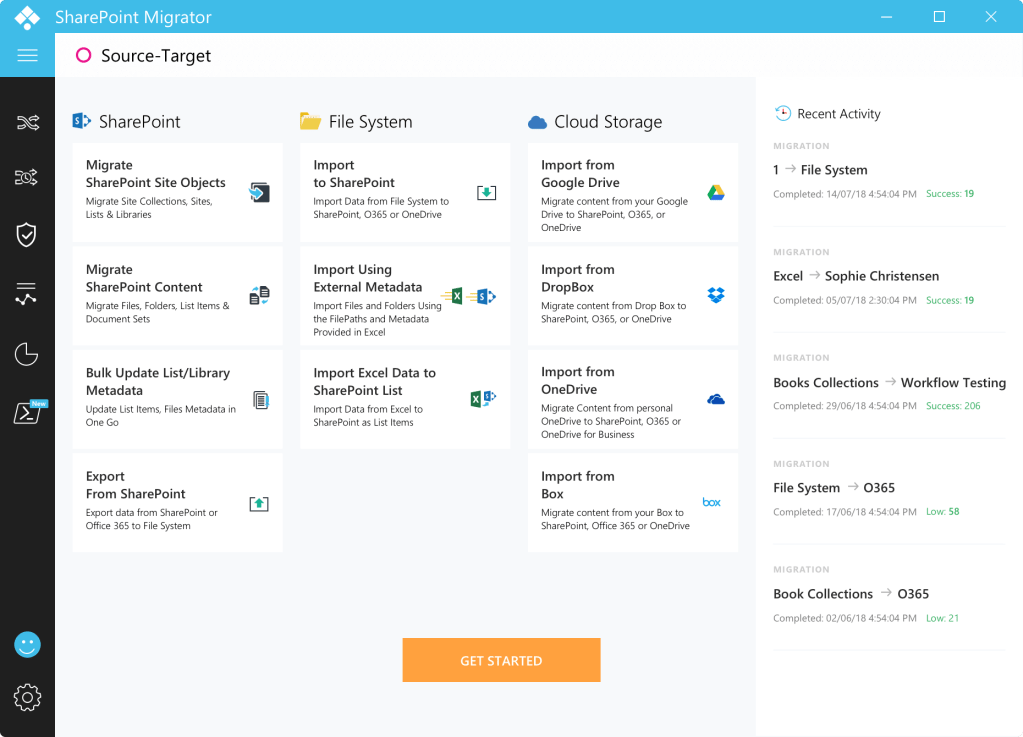
Our SharePoint Migration Tool offers a wide range of Migration modes that include on-premise, cloud as well as SharePoint version to version transfers. Further, our features such as Selective migration, PowerShell Scripting, Scheduling, bulk editing, comprehensive record keeping, Security Manager along with Pre-Migration as well as Post-migration modules successfully puts us ahead to give your migration experience an edge over others!
Migrate from a wide range of Source Inventories
All SharePoint versions and O365
Migrate content from any SharePoint version and O365 to other. We ensure that the high level of adaptability of your data in the new version prevails throughout.
Popular enterprise cloud storages
Cloud data comprises a large fraction of data in any industry. Thus, effective Cloud content migration to SharePoint is quite an essential feature of a migration tool. Saketa flawlessly accomplishes this task, making cloud to SharePoint migration quite easy.
Network and File storages
An Organization might wish to migrate all their files together, arranged in the same manner. Saketa SharePoint Migration tool allows Migration of an entire File System to SharePoint Lists & Libraries. It also provides an option to attach custom metadata to the files/folders at the time of importing.
Excel Files
Microsoft Excel being one of the most frequently used file types, the migration process might involve a lot of Excel files to be imported to the newer SharePoint versions. Our migration tool for SharePoint facilitates you to directly import and automatically update Excel file contents to SharePoint lists.
Migrate anything to SharePoint
Site Objects
Migrate SharePoint Site Collections, Sites, Lists & Libraries in one place!
Content Migration
You can use the SharePoint migration tool for migrating Files, Folders & List items smoothly and intricately organizes them.
Users, Groups, Permissions and Metadata, Workflows
Our tool lets you migrate users, groups, permissions & workflows from one site to another in one go for a hassle-free experience! !
Term stores & Term Sets
Managed metadata helps you easily classify and organize your data according to your company’s taxonomy. Saketa SharePoint migration tool lets you migrate your taxonomy metadata effectively in one go.
Stress free Migration Analytics
Pre- Migration
Pre-migration creates a detailed report of all possible errors and warnings of your content that might occur at the time of migrations, so that you know all the risks before even migrating and can come up with ample prospective solutions to them beforehand!
Comprehensive log of every Session
Saketa migrator keeps an intricate record of all your SharePoint migration sessions and other related activities so that in case of anything going wrong, you can use them as referrals and guides.
Post Migration
Thorough report of your migrated content is created as well as validated to make sure there are no unnoticed migration failures and if found, they can be rectified appropriately at the right time.
Premium (Advanced) Features
Security Manager
Security being the prime concern, our dedicated Security manager tool helps you to control security of all your sites without any worries with its vast set of security features and ensures absolutely No-Risks towards any security glitches.
Bulk Edit/ Import External Metadata
Our migration tool lets you update all your metadata in one place & in a single go!
Content Backups with Export to File Systems Our SharePoint migration tool helps you perform backups by exporting your SharePoint Sites to File System so that there are no chances of data loss.
SharePoint Enterprise Content Management or simply, SharePoint Content Management has been a major defining factor to ensure the successful utilization and governance of the SharePoint platform. Thus, it is wise to chalk out a proper SharePoint content management plan as well as have a great content strategy as a backup.
SharePoint has always been known for its enhanced security and impeccable sustainability. This makes it the favorite choice for a lot of SMEs and enterprises alike. Microsoft 365 and SharePoint thus boast of being the best one-time investment content management platform that brings you efficient low-cost storage, easy remote or hybrid access, and obviously, quite high security.
However, SharePoint Migration is not as simple as it seems. Migrating to SharePoint is much more than just clicking on a SharePoint migrator and getting all the points sorted. Instead, ensuring a good governance feature in the SharePoint Migration tool is a must.
This is where having a proper content management plan turns out useful. A SharePoint CMS or SharePoint Content Web Management System allows the users to publish, edit and arrange content. It might also provide tools to manage workflows in a collaborative environment.
Therefore, it is time to redesign the file structure and security system to keep the system organized while migrating to a higher version of SharePoint or to SharePoint Online.
Migrate Only the Required Items and Latest Versions
Most users have a “Deletion-Phobia”. They are famous for their habit of stacking up things instead of deleting them. The thought behind it is always “What if it is of use in future.”
But little do we realize that these extra files or the unnecessary older versions of these files are a liability.
As a result, a lot of space is wasted by overcrowding as well as older version stacking. Take up migration as an opportunity to clean up your memory and enjoy smoother navigation across it.
Keep a Special Preference for enhanced Security
Security is quite essential. Make sure your governance is strong enough to manage the access rights and every user is automatically assigned so according to their job requirements. The best way to ensure proper security is to make sure that your SharePoint Migrator has an inbuilt Security Manager.
Reorganize
Whether you are migrating from SharePoint On-Premise or other versions, organizing documents is important. In SharePoint, we need to avoid the security settings in the folder structures and rather, keep it at the site level or document library level. Therefore, it is important to reorganize your content effectively.
Have a Backup Plan
Data Loss is a major concern that is inevitable in rare cases but can become very grave if not handled properly. A proper data retention plan must be in place. A backup storage system, either online or on-premise needs to be maintained so that no data loss is permanent.
Post Migration SharePoint enterprise content management is quite a significant aspect to consider when planning an upgrade to your SharePoint platform. Plan precise and to the point and enjoy hassle-free SharePoint Content monitoring.
Empower Your Hybrid Workforce with Modern Intranet
A great intranet can empower your workforce (remote or hybrid) with collaboration software and policies in place to enable your hybrid teams to be efficient and company-focused, whether they are in the office or at home.
In fact, modern intranets are well equipped with powerful communication and collaboration features that can support your remote workforce software and enable all your remote and in-office employees to work effectively. A good intranet can be used to keep everyone informed, engaged and most importantly to encourage collaboration amongst a globally spread workforce.
The perfect remote digital workplace: Empower Your Hybrid Workforce with Modern Intranet
With the current shift in the way we are working, the efficiency of your collaboration tools is indeed a defining factor for your overall remote workforce productivity.
Collaboration is a necessity in today’s world whether it is for meetings, project discussions or simply for daily workplace social interaction. A digital workplace is the virtual alternative to the coffee or water cooler conversations as well that engage your colleagues on a personal level and maintaining a good digital workplace should be as effective as it.
Here are the ways we believe a modern intranet platform can connect and empower your hybrid teams to ensure business continuity.
Enhanced Engagement
Collaboration and Employee engagement are central to every modern digital workplace, especially one that includes remote workers. So, everyone wants the best tools and means to make the most of team collaboration no matter where employees are. Whether it is to find the right person to answer a question or sharing news and gossip, these tools take care of everything.
Better Crisis Communication
A modern, intelligent intranet gives you access to all the publishing tools you need in an engaging way. It also allows for two-way interactions. The customizable site templates are included as well to get started almost instantly and effortlessly.
The Mobile App
Many employees may still be adjusting to hybrid work life. They may not be at the best comfort as in-office or have certain access to information challenges. Your digital workplace mobile App gives your team instant access to the communication and collaboration solutions they need to get work done from wherever they are, on any device.
This means everyone is well connected no matter where they work from and have all organization updates and news at their fingertips, with an effective intranet mobile app.
Reach Us out to get to know about SAKETA ENGAGE
Minimizing the Emails
Dashboards and information centers within an intranet can make the most of the medium through responsive templates that streamline the design and copywriting process and targeting capabilities to ensure that the important updates reach the right eyes.
Centralized Resources
Make it easy for employees to get their hands on the information they are searching for by centralizing all resources related to crisis comms. A dedicated site page or information portal serves as a hub, bundling together statements from senior leadership, changes in procedure, and notifications regarding safety. Empower Your Employees who are completing their tasks remotely will see a reduction in the time-spend associated with gathering news and updates and exchanging with the in-office team.
Maintain Privacy
Hosted collaboration software solutions always have maintenance and security challenges. Keeping a check on user privacy and accidental user-induced vulnerabilities can be a nightmare for any administrator. Here, the intranet can save the day by incorporating the privacy-conscious culture and prevent duplication of information across multiple platforms with a unified secured collaboration portal approach.
Uniform internal branding
A smart intranet can build a consistent internal branding of the company’s vision, showcases the culture and values to across the workforce and stay engaged. This is very important when the face time and the physical connection among teams is minimal.
Give your Hybrid Workforce an intelligent Intranet.
The effect of pandemic on the way we work will remain for a year or more say experts. The good thing is many organizations have cracked the way to still stay productive is with a well-structured remote workforce policy and hybrid working models. In both cases, having an awesome modern intelligent intranet experience can work wonders, optimize collaboration challenges, and enhance productivity.
Get in Touch with our experts to know more about how Saketa Intranet can enhance your Digital workplace experience to drive greater productivity.
The COVID-19 situation helped us realize the potential and adaptability of remote work, Hybrid workplace Microsoft 365. As more and more organizations started upgrading to Digital Workplace Solutions such as Microsoft Teams, Google Workspace and SharePoint intranet, the permanency of remote work took up a believable form.
But still, while many employees might have missed being at the office and would readily wish to come back, a section of them might have discovered their comfort zone in remote work and would prefer to continue with it. Furthermore, a full-time remote workforce is not practical for all companies.
The “Back to Work” Plan
With vaccination drives functional across the world, every organization is keen on planning the way work is to function in the post-pandemic period.
As the various developments towards going back to work progress, businesses across the world are trying to figure out the best work model post-pandemic. While some employees prefer going fully back to the office, a large fraction prefers flexibility between the office and work-from-home routine. The main reason for this is the opportunity to collaborate with colleagues and exchange ideas in a more immediate and dynamic environment. Thus, the concept of Hybrid workforce came up.
The Hybrid Offices are simply, half and half working environment that accommodate both remote and in-office employees. Either an individual employee’s free will or the location-specific factors of their work may thus decide if they are to act as completely remote, completely in-office or hybrid workforce. The new hybrid model may be the solution because hybrid teams do not conform to just one working environment, rather adjust the working conditions according to the comfort and professional requirements.
As the conditions begin easing up, we certainly know that the hybrid workforces are here to stay. In such a scenario, the enterprises will need to increasingly lean on cloud-based applications and infrastructures to establish productive communication and collaboration among the remote and in-office teams. Hybrid Workplace Microsoft 365 can work together to bring in great productivity.
This cloud infrastructure must be reviewed and expanded periodically to support the gradual transformation to a hybrid work environment. This can be initiated right from migrating to the cloud-based platforms and then, can be extended by adapting to SaaS Digital Workplace solutions such as MS Teams and SharePoint intranet.
Microsoft 365 Tools that can help Power up your Hybrid Workforce.
Microsoft SharePoint
A new working model needs to bring in the use of new collaboration or productivity tools on a platform that best supports your organizational growth. A platform, that takes care of all your business needs, direction, and strategy!
Every new version of SharePoint comes with loads of new features and utilities. If you wish to be ahead in the race, SharePoint Migration will be great to invest in. It will get you access to the whole set of Microsoft 365 tools to make your journey ahead a lot predictable and manageable as well.
MS Teams & Teams App
Microsoft Teams now has more than 30 million daily active users, influenced by the fact that it is available at no additional cost to people working with Microsoft 365. It was designed while keeping the exponentially increasing popularity of Remote work in mind and is aimed at forming a hub for teamwork in the most effective way possible. It combines one-to-one messaging, group messaging, voice calling, video conferencing, and document collaboration into a single integrated application to enable exciting new ways of working together. The Modern Digital workplace, when coupled with Microsoft Teams can literally do wonders!
Other Deployable or Third-Party Apps
SharePoint Intranet
SharePoint Intranet Suite leverages the power of the Microsoft 365 applications to deliver the best end-user experience. Being based upon SharePoint, it offers plenty of options to integrate Business Apps as well as other third-party apps to empower and upgrade your hybrid workforce.
Google Workspace
Google workspace is the all-in-one collection of cloud computing, productivity and collaboration tools, software, and products by Google. It lets your business have access to a whole palette of collaboration tools like Gmail, Calendar, Meet, Chat, Drive, Docs, Sheets, Slides, Forms, Sites, and more. Opt in for an end-to-end collaboration experience.
Project Manager
Manage tasks, maintain accountability, and improve productivity with project management applications. It lets you.
Secure access to your projects
Check project health.
Identify Bottlenecks
Visualize the progress.
Timesheet
Timesheet applications are your time management partner for SharePoint and Microsoft 365. It lets you.
Export Timesheets for downstream operations
Generate powerful and insightful reports.
Zero in on your most profitable customers
Track time spent on tasks by the in-office and remote teams.
How to see further ahead?
Predicting the challenges that lay ahead is not quite simple. But it is good to plan out how to utilize the flexibility of hybrid workforce to bring in the best for your organization. Hybrid workplace Microsoft 365 is a great partnership to choose.
Today, all businesses necessarily need remote technologies to keep their businesses running. Tomorrow’s leaders, however, may find hybrid a much better option. Therefore, upgrade your technology and be feature-ready to keep your business seamless.
on SharePoint and Office 365. Request a Free Demo Now.
SharePoint Intranet Suite
The Best Digital Workplace Solutions on SharePoint and Office 365
We Redefine the way you Engage Employees
Your very own Unified Virtual Workplace, Away from your Office space
A One stop Digital Workplace, Anytime Anywhere !
In SharePoint or MS Teams; On any device, web browser or mobile app, have everything you need from all your enterprise applications at one place, personalized and accessible at your fingertips.
Engaging and empowering workplace for everyone
Great employee experience to stay in sync and focused with all things that matter.
Stunning desigs that keep your employees hooked
Efficient Content Management tools to eliminate the multiple facets of SharePoint content creation needs
“No” is too good with Saketa
No code platform, just configure to design, build or connect
No additional infrastructure or hosting needs
No maintenance hassles, just a one-time licensing cost
Saketa Intranet + Microsoft Teams = Awesomeness
Leverage the Power of Microsoft Teams, coupled with Saketa SharePoint Intranet Suite, to Unify all your communication and collaborations on a single platform.
A companion mobile app, smart and personalized, getting the important and the needful resources or updates handy on the move accompanies Saketa SharePoint Intranet Suite.
An effective intranet adoption can be a major factor in determining the productivity brought in from internal communication, collaboration, and employee engagement in an organization. In every organization, a good fraction of employees doesn’t utilize the company intranet by any means just due to lack of knowledge of the platform.
Getting your Employees to really utilize your social intranet can be quite a challenge, to begin with.
For some individuals, a dread of the new unknown can be sufficient to impede progress. Fortunately, there are various things you can do to ensure your social intranet isn’t just being used but being utilized to its full potential. Start with simple tips, follow Intranet Best Practices and then gradually get innovative with how you can give them an advanced collaboration experience.
There are a few different ways to drive intranet user adoption, during, and after setting up your intranet platform.
Reasons Behind Poor Intranet Adoption
Ever pondered upon what are the reasons that lead to intranet adoption fails? Here are some of them:
Complicated Framework
User-friendliness is too important for an intranet. A complicated user interface will directly imply that a larger fraction of employees will in general try to avoid it. If the intranet isn’t easy to understand and use, intranet adoption will definitely be a significant issue.
Irrelevance
Irrelevant content kills the mood. Content should be new, crisp, and relatable. At the point when the employees sign into the intranet, they must not come across obsolete or outdated content, else, losing interest is a common phenomenon.
Build your employee intranet portal based upon the user’s point of view. Carry out a survey before implementing the intranet as well as continuous review from your users to get a comprehension of what exactly do, they need. You can carry out the intranet and train them to utilize the intranet.
Pay attention to User Feedbacks.
Your present intranet needs may evolve with time. Get your user feedbacks regularly to ensure that the purpose is always being fulfilled. Recognize potential pain points and discover approaches to fix them for greater ease of use.
One of the major pitfalls that lead to a failed SharePoint Intranet adoption is letting your content go irrelevant, obsolete, and backdated. Nobody would
like to engage over a platform that is unable to serve something new every now and then. This can make it feel like your intranet has ground to a halt and that no one is utilizing it. With consistent new content creation, you can easily beat this issue.
Work through Transitions
SharePoint intranets, assist you with smoothing out your existing business processes to aid profitability. Yet it is important to make your employees comfortable through these technological transformations. these might include initiatives like organizing training and workshops to understand the intranet better. Don’t force them off from one platform to another, instead, efficiently engage them on the intranet so that they organically get used to it.
Add a Tinch of Fun
Social intranets are, obviously, essentially utilized for overall professional needs, but there’s no harm in defying the monotony by adding fun elements. This in turn will help with engagement and productivity.
Make it as interactive as possible with quizzes, competitions, challenges, surveys, and off-subject conversations as well. You don’t need to go over the edge — little components of fun are typically everything necessary to bring in a major effect.
Be Experimental
Adopt an Experimental Strategy. The condition of social intranet software is consistently in transition. This implies that you can anticipate new elements to show up as things progress. Adopting a trial and error strategy to experiment with various aspects of collaboration will surely excite your employees by giving them new experiences.
So, by chance, if you have a splendid thought that is somewhat fresh, don’t stop for a second. Share it over your intranet and let your whole organization implement it or at least, brainstorm through it.
Choose an Intranet with a Mobile App
Dealing with remote workers puts up a lot of emphasis on mobility. Accessibility is the pioneer in such cases. Your employees must be able to access your intranet from literally anywhere.
Having an intranet mobile app can bring in a lot of difference. Or, if a mobile intranet app isn’t feasible, at least opt for an intranet that is responsive enough to be used on mobile browsers.
Final Takeaway
An intranet can be a great asset for your organization when it comes to increasing employee engagement, improving collaboration and much more. Your progressing endeavors before, during, and after setting up your intranet will always be a defining factor to ensure organizational success through it. Thus, plan and implement your adoption wisely.
The hybrid work model has gained a lot of popularity since the beginning of the COVID-19 pandemic. Numerous organizations went on to plan out whether a permanent remote workplace has a chance for a long-term basis. Generally, it was a successful transformation to be freed from the limits of an actual office by breaking the previous misconceptions that remote work was not efficient enough due to the lack of super vigilance.
As the restrictions eased, the consideration about remote work moved to bringing individuals back into the workplace. But the employees haven’t been quite keen to the idea. The pandemic has permanently transformed us and the way work can be handled.
This paved way for a new working environment model: The Hybrid Office or simply, half and half working environment.
A Hybrid WFH model allows a few employees to work from home while a fraction of them occasionally work in office premises. This can be implemented according to the work prioritization as well as the proximity of the employees from their offices.
In this system, you may have specific teams split between working in-house and in-office according to their convenience and work prioritization. You may even assign certain positions or positions of authority to monitor the completely remote or in-house employees across all departments.
This is not to be confused with the flexible workplace where the employee can split their time working remotely and at the workplace during the week. Here, when a person is assigned WFH, they will burn through most workdays far off (with the potential for intermittent office visits). In-premises teams will do the exact inverse.
There are a few advantages for organizations going to this work style, which we will get into straightaway. However, this model accompanies its own arrangement of difficulties to consider as well.
A year back, we were rapidly discovering that COVID19 and its effects were too unpredictable. We found that we were expected to build up a back-to-work plan that could be implemented and altered along with continually changing general medical issues and government direction while keeping the employees safe. We likewise expected to drive a steady methodology across geologies, making a unified together COVID-19 reaction exertion inside the organization.
Considering this, we can build up a Hybrid Workplace strategy that anchors to characterized stages – as opposed to explicit timetables – and permits us to rapidly change our work destinations relying upon ailments, while additionally remaining information-driven as well.
Each stage is characterized by a bunch of information-driven rules (for example patterns in cases and passing’s and government rules) just as site availability appraisals and conveys with it a bunch of endorsed approaches and activities.
Although it is impossible to predict everything the coming months, we can be prepared to face them and excel them with a growth mindset by learning, communicating, collaborating, and reevaluating, and remodeling our working way as needed.
The hybrid work model takes us to rethink our estimation of execution. Customarily, businesses need to have as a large part of the labor force present at the workplace, ensuring hours worked, augmenting productivity. The board would take a gander toward the culmination of tasks from an “hours inputted” sort of view.
Presently, for certain representatives working distantly, it gets essential to pinpoint who is straightforwardly answerable for what project and have an unmistakable comprehension of the amount they can reasonably accomplish in a day. The concentration for the executives becomes improving efficiency—supporting colleagues with the assets they need and checking projects in a reasonable work process.
Fortunately, there are labor force planning apparatuses accessible which assist businesses with overseeing shift revolutions, organization breaks and oversee plans from any gadget or area to work with far off work. These instruments are not just helpful for the administrators—by utilizing them, everyone from the group keeps awake to date on who is doing what, and what progress is made regular.
Economical & Employee Friendly
A hybrid workplace focuses on the employees and empowers a more grounded balance of fun and serious activities. It moreover can help ease tension representatives may have identifying with getting back to a public workspace, and those prominent above identifying with public travel. This is especially basic for those really focusing on, or who themselves, are immunocompromised.
A hybrid working environment is additionally a more practical working environment. With less dependence on huge scope workplaces, associations can save a great many dollars in land and office support costs.
Associations offering a mix of in-office and remote employees will likewise have a bigger ability pool to work with, as they will at this point do not be limited to recruiting representatives in explicit geological districts.
Also, a hybrid working environment can help assemble an emergency tough culture by planning associations for likely future lockdowns. With numerous representatives previously telecommuting, your work environment can undoubtedly adjust back to a completely distant climate if essential.
Lastly, it can diminish the spread of infectious infections, as representatives can decide to telecommute on the off chance that they are feeling unwell.
Conclusion
The pandemic has enabled us to rethink the working environment, and the chances to enhance it. But for it to be successful, it should be planned and executed well.
While the hybrid work environment may appear to be a response to a transitory issue, it is actually an answer to so many long-term problems. It just requires some discovering approaches to design and adjust to the new parameters of work, security, communication, and mental health.
Even after we go back to normal, the hybrid concept will make our work-life balance better and healthier.
Collaboration Strategies play a major role in boosting employee engagement as well as the overall company performance. It has been observed that the organizations that have been keen on stressing upon giving their employees an awesome collaborative advantage have been able to generate a lot more revenue during these remote work tenure as compared to their usual office days previously.
Teams collaboration strategies ensure that the data, time, and different assets are shared and helps everyone with their tasks. At the point when people work remotely together, every individual must have a chance to contribute their best ideas and strategies to contribute to their team’s overall productivity.
Effective Collaboration Strategies
Internal collaboration help realize your set up goals to establish a proper connecting link across the organization. It does include the involvement of every department along with the executives. The best internal communication systems allow unrestricted flow of information from the peer to peer as well as across top to bottom.
How chiefs identify with and draw in with their representatives straightforwardly associates to how dedicated staff will be to their jobs. The best interior interchanges aren’t simply caught in a top-down relationship. They move every which way across the organization, from base to top and even distributed.
How to improve collaboration in the workplace?
Let us look at some of the best strategies to establish so-
Facilitate Continuous Contact
Teamwork always demands clear and continuous communication. Continuous contact eliminates the errors caused by an intellectual gap of different team members and thus, resolves every work conflict. It additionally diminishes the confusion and copied endeavors. It might include:
Creating different forums like Idea board for employees to convey and share thoughts and brainstorm together to come up with new ideas.
Helping the employees that will help them with building up their leadership presence.
Value and Empower Your Employees
You can engage your employees by letting them make their own decisions. Give them the freedom and responsibilities within their scope of work. Employee inspiration can be expanded by planning a powerful compensation framework, regular feedback system, celebrating wins, sharing credits, and much more. Motivated employees can empower your business to beat all the industry competitions.
Let your employees’ conveniences count such as flexibility, choice of work hours, choice of working in the office or remotely, and let them have their choice whenever possible. This in turn will enhance their mindset to work towards overall organizational productivity.
Leverage Technology
Numerous advanced collaboration tools such as an Employee Engagement platform and Microsoft Teams have made remote collaboration extremely reliable. A simpler and smoother set of coordinated efforts between the teammates regardless of where they’re based is a major deciding factor for ensuring team success. As new platforms become accessible, employees progressively depend on joint effort innovation to gain ground on projects, get contribution and help plan to help boost creativity and innovation. Instances of coordinated collaboration technology include:
Internal panels such as SharePoint intranet to improve correspondence and information sharing
Teamwork, collaboration, cooperation and coordinated effort in the work environment don’t occur all alone, they go hand in hand.
When the employees are supported by their seniors and leaders and understand every aspect and advantage of collaborating, it results in strong and reliable teams.
Driving higher advancement and coordinated effort might be a difficult exercise for top executives but is always effective. From developing the appropriate work culture to making the correct tools and networking opportunities accessible to all, the methodologies regularly require a reevaluation of your present cycles of works and processes.
Final Takeaway
Collaboration and Teamwork are interdependent. As internal communication and collaboration strategy has rapidly advanced and developed from its obsolete ways, therefore, an efficiently collaborative digital workplace is presently accessible to all.
Focusing on and prioritizing the inputs and views of your employees is basic a foolproof effective collaboration strategy. Once you establish an efficient collaboration outline, surplus productive developments will naturally follow.


 SharePoint Migration Tool - Saketa.com